
Search a Package Repository
Test Automation Package Manager searches for available packages in the following repositories (a repository typically contain pre-defined test steps, instruments, DUTs, and connections).
-
File-based repositories, such as C:\MyPackages\ or \\MyPackages\. A file-based repository is a folder that contains .TapPackage files and any legacy packages that use the .TapPlugin extension.
-
Web-based (HTTP) repositories. Contact your IT department for instructions on how to set up or get access to a server.
To work with repositories:
-
In Package Manager, click Settings.
-
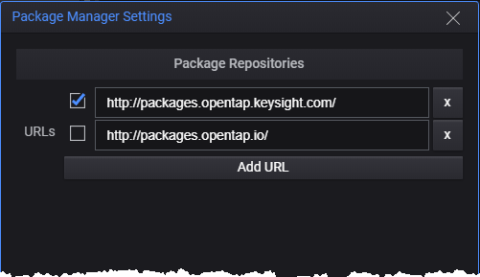
On the Package Manager Settings dialog:
- Click Add URL to connect to a repository. Enter the repository's URL or network share.
- Use the check boxes to enable/disable searching of specific repositories.
- Click the Delete (X) button to remove a repository from your list.
-
When you close the dialog, Package Manager:
- Inspects the packages in the active repositories
- Refreshes the list to show the packages that are compatible with your:
- Test Automation version (same major number, same or lower minor number)
- Operating system
- Displays an error below the search field if it cannot connect to a repository