
User Interface Tour
This section introduces you to the PathWave Desktop Edition Graphical User Interface (GUI). You will learn how to navigate through the GUI elements and view some features and functions, before you begin working with the interface.
Home View
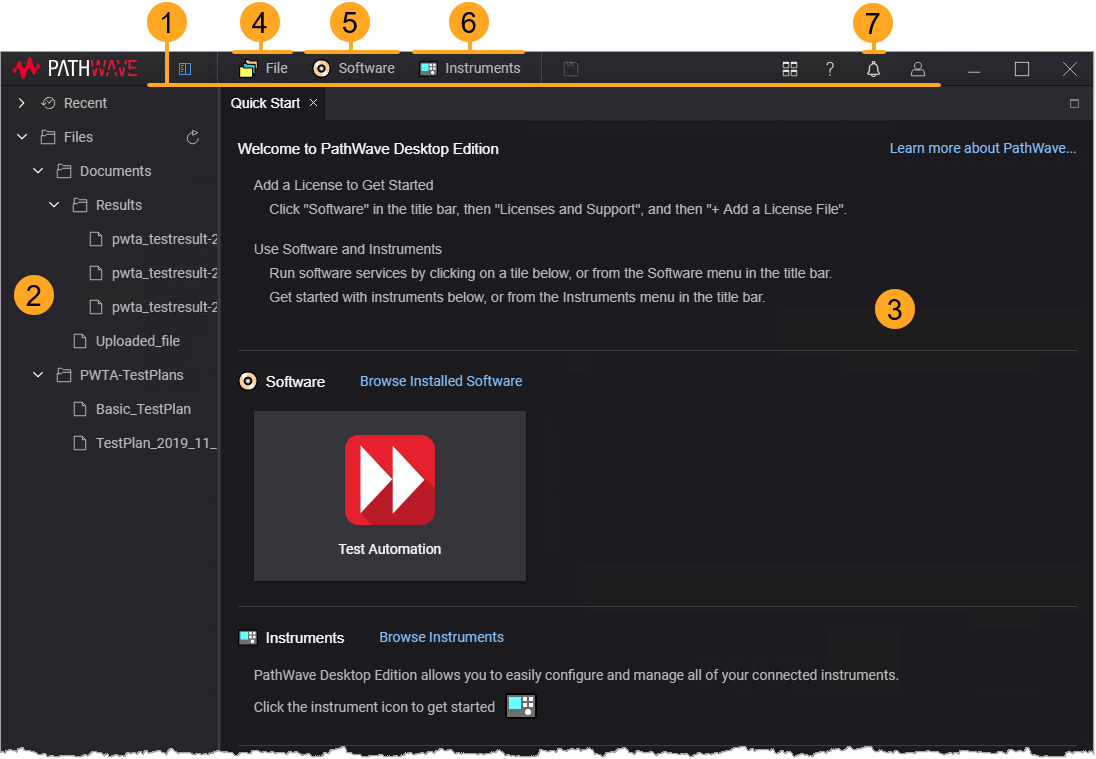
| # | Description |
|---|---|
| 1 | The Title Bar contains buttons and menu options to access the most commonly used functions. |
| 2 | The Project Tree lists the files and directories associated with the current project. |
| 3 | The Quick Start lists the recently installed software and instruments. |
| 4 | The File View lists and lets you manage files and directories available in PathWave Desktop Edition file system. |
| 5 | The Software View lists the installed software and lets you manage them. |
| 6 | The Instruments View lists the connected instruments and lets you manage them. |
| 7 | The Notifications Window displays the messages generated by PathWave Desktop Edition. |