
View Files and Folders
The File View enables you to view the files and folders present in the PathWave file system.
To View Files and Folders
-
Click
 .
.
The Open File view is displayed listing the files and folders in the project.
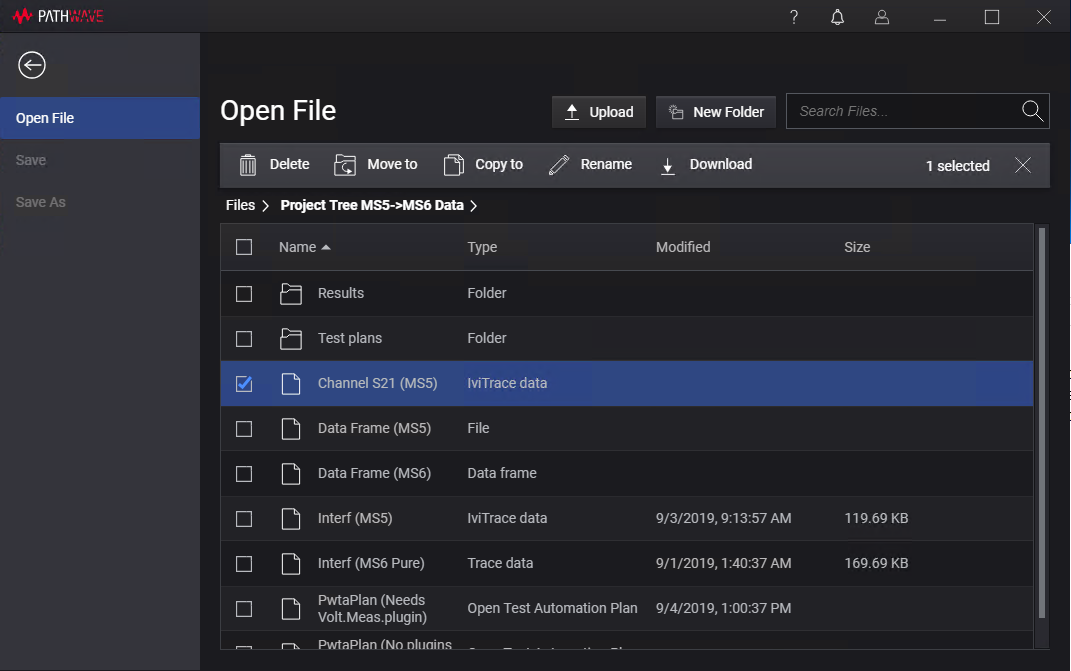
Following details are displayed for the listed files and folders.Column Description Select All Option to select or deselect all the items in the list. Name The name of the file or folder along with the icon. Clicking on the file name will open the file in the associated PathWave service. Type The type of file. Modified Date and time when the file was last modified. Size Size of the file. - Click on the column name to sort the entries by that column.
- Click the check box to select an item in the list. The selected items are highlighted with a blue background.
- Click a folder name in the list or in the breadcrumbs to navigate the PathWave file system.
See Also
- Search for Files and Folders
- Rename Files and Folders
- Copy Files and Folders
- Move Files and Folders
- Delete Files and Folders
- Restore Deleted Files and Folders
- Upload a File
- Download a File
- Open a File
- Save a File